| Programs used: Alpha 5, Navicat, HeidiSQL, Excel | Skills needed: HTML, MySQL, VBA, Xbasic, Javascript |
Project Background
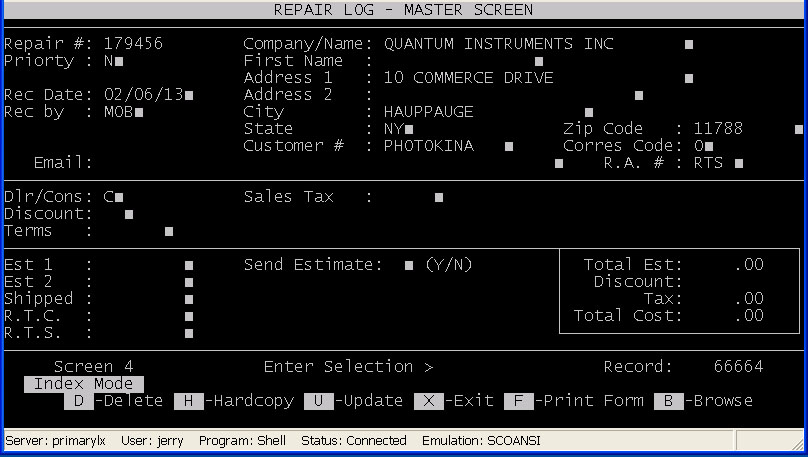 |
The repair system that was currently in use was written in File Pro, shown here on the left. A very old and limited database program.
File Pro had none of the great tools found in today’s relational databases. Think of it as a giant excel file with a fixed number of columns.
Each entry was a row with no relationship to any of the other entries. As a result it was nearly impossible to tell whether a customer had
sent in a repair before. To make matters worse the number of columns (or fields) were limited. The field that held the actual repair work
was limited to three columns. If a repair required replacing four components the tech could not enter in all four and had to leave one out.
| |
|
Because of the limited fields, many fields were serving double duty. The customer ID number field may or may not hold, customer ID, phone
number, or even email address. Making impossible to search for a customer when an inquiry was made.
The amount of money that was charged for a repair was set by someone in the front office and was based on guess work. No one knew the volume of repairs, how long repairs took, and how much money we should be charging. It was time for something better. |
||
Project R and D
|
This was a huge undertaking. I knew very little about the current system and I knew absolutely nothing about database programming. I decided on a
plan for tackling this challenge. My first step was to enroll in a couple of night course at a local community college to learn databases and database
programming, Next I set about learning how the current repair system worked. It was important that I kept the work flow as consistent with the old
system as possible while adding improvements.
Over the course of several months I learned database programming and created a wish list of improvements that were to be the center piece of the new system. Here is a partial list of those additions:
|
Results
Once the new system was in place I started collecting data. After three months of data collection reports could be generated. We noticed that we were undercharging for some repairs and over charging for others. With the new system in place it was possible to adjust the repair charges to reflect actual cost. Below is a table with some of the other findings the reports generated:
| Findings | Effect on Policy | Benefits |
|---|---|---|
| Repair from large end users covered the spectrum from simple updates to complete unit rebuilds. Yet the amount charge would not always reflect the work performed. | For this class of customer create a flat price system. The customer, with their permission, would pay one fixed rate per unit. This flat rate reflected the average cost. | This dramatically cut done on the amount of time the front office spent on billing and negotiating with the customer. The customer knew what the repair charge would be prior to send in the units. |
| 97% of the units repaired did not come back for a second until more than a year later. | Repair warranty policy was changed to include the entire product and not just the work done. | The change in policy helped smooth over any objections to the increase in repair charges. The customer knew that if anything went wrong with his recently repaired unit during the warranty period the repair would be covered. Even if the new problem was not related to the original repair. |
| 92% of the units sent in for repair were greater than 3 years old. | This meant we could offer a 3 year warranty on all of our products at no cost to us. | The 3 year warranty was wrapped up into a bigger promotion. We were celebrating 36 years in a business and used the 36 month warranty as a selling point. |